
Knowing how CRE brokers use location intelligence to win more deals is quickly becoming essential. 88% of CRE professionals expect revenue growth in 2025-2026, up from just 27% the year before, according to CREA United’s 2025 industry report. As deal activity picks up, brokers who can research faster, present stronger insights, and back recommendations with data have a clear advantage.
The brokers winning in this market are not always the ones with the biggest teams or the deepest databases. They are the ones who can walk into a client meeting and explain what is happening in a neighborhood right now, with live evidence to support it. This guide shows how to do that, from evaluating an unfamiliar site to building a pitch that is clear, credible, and hard to challenge.

What Location Intelligence Actually Means for CRE Brokers
Location intelligence is the practice of using geographic data, analysis, and place-based business signals to evaluate what is happening in and around a specific place, a definition broadly aligned with Esri’s overview of location intelligence. For CRE brokers, that means answering questions clients ask every time: Is this neighborhood growing or fading? Who else is operating here? What do customers actually say about the businesses already in this area?
Traditional research meant pulling CoStar, running a Google Maps search, reading a handful of Yelp pages, and piecing together a narrative manually. That process takes hours and often produces a fragmented, manually assembled view of the market.
Location intelligence tools compress that workflow into a single research pass. Instead of bouncing between CoStar, Google Maps, and review sites, you can search a business type, see competitor pins on an interactive map, click a location, and read an AI-generated summary of customer sentiment, business activity, and local context in one place. The key distinction is that the strongest platforms are not relying on a static database. They pull live data from sources like Google Maps, Yelp, TripAdvisor, and Instagram, which matters when a submarket is actively changing.
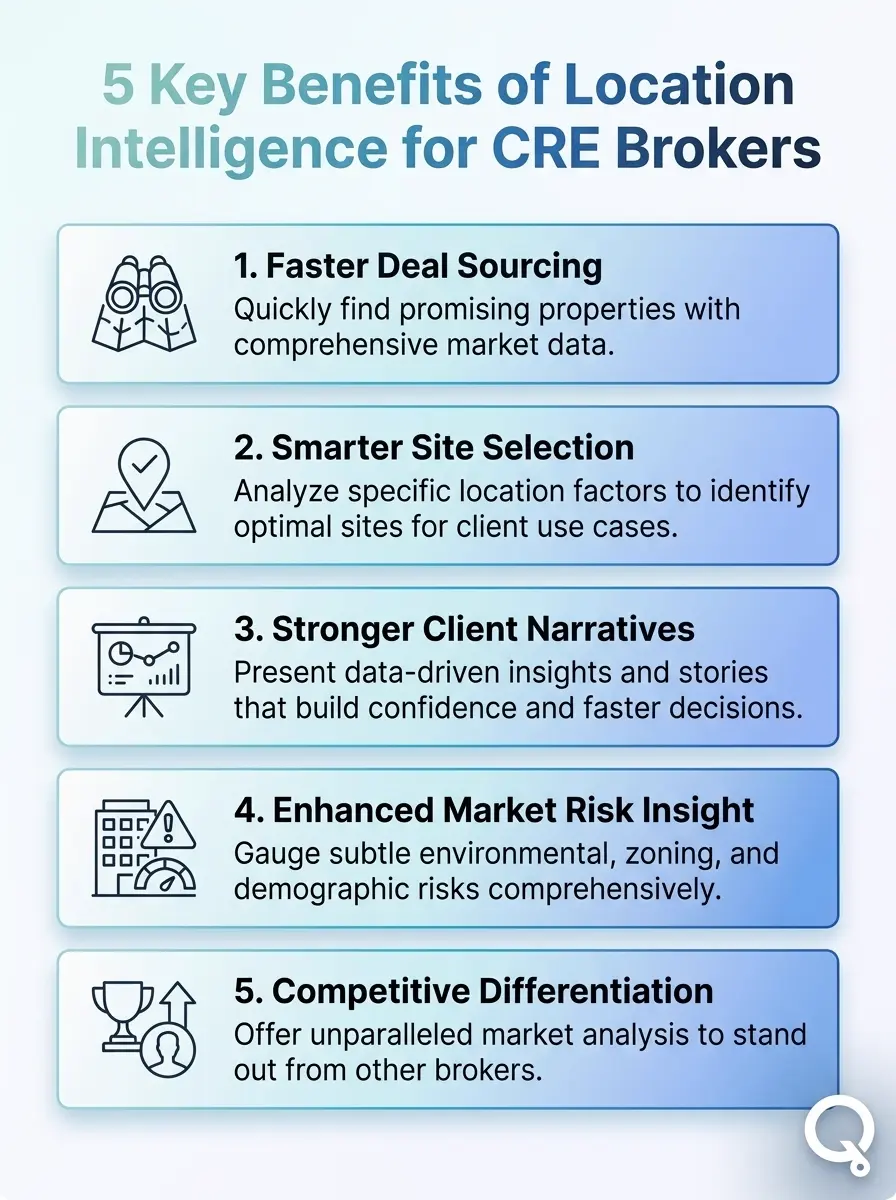
Discover five ways location intelligence helps CRE brokers win more deals. From smarter site selection to faster market insights.
Five Ways CRE Brokers Use Location Intelligence to Win More Deals
Location intelligence is not one feature. It is a set of capabilities that slot into different parts of the deal cycle. Here is where it makes the biggest difference for brokers researching commercial sites.
1. Evaluating Neighborhood Trajectory Before a Site Visit
Before you drive out, you can quickly see whether a neighborhood is gaining or losing momentum. Map the business density, filter by category, and review what customers are saying about nearby operators. A few clicks can show whether an area feels active and growing or weak and overbuilt. As Mapquery puts it on their commercial real estate use case page: “Before you commit, or pitch it to someone else, it’s worth knowing what the neighborhood is actually like.”
2. Mapping Competitor Density and Market Saturation
One of the most common client questions in CRE is: “Is this market saturated?” Location intelligence gives you a direct visual answer. Type a business category, map the competitors in the area, and quickly see where they cluster and where there may still be room in the market. For a tenant rep broker, that turns a vague recommendation into a defensible one.
3. Surfacing Real Customer Sentiment Near a Target Site
What customers say about nearby businesses can tell you a lot about the neighborhood’s health and foot-traffic quality. Repeated complaints about parking, safety, or visibility can affect how you price and position a site, while strong reviews and repeat-customer signals can support the case for demand. Mapquery’s Quick Review button feature pulls those signals together from live platforms, so you do not have to read hundreds of reviews manually.
4. Comparing Multiple Candidate Sites Side by Side
When a client is deciding between two or three locations, a broker needs a clear side-by-side comparison. Location intelligence helps you save research for each site, organize findings in one place, and present them in a format clients can easily follow. Instead of juggling screenshots and notes, you get a cleaner and more repeatable workflow.
5. Answering One-Off Client Questions On the Spot
Clients often ask questions brokers cannot answer on the spot, like what foot traffic is like on weekends or whether a certain type of business is nearby. Mapquery’s Custom Query feature is built for that. Type the question in plain English and get a direct AI-generated answer tied to that specific location, backed by sources you can review and verify.
Did You Know?
Offices in lifestyle districts can attract a 32% rental premium.
For brokers, that is a reminder that neighborhood context and nearby amenities can materially affect how a site is positioned and valued.
JLL Global Real Estate Outlook 2026
Real-World Use Cases: Three Broker Scenarios
Location intelligence works differently depending on what type of CRE deal you are working. Here are three concrete broker scenarios where it changes the outcome.
Scenario 1: Tenant Rep Broker Pitching a Retail Expansion
The situation: A regional fast-casual brand wants to open two new locations. It has narrowed the search to four submarkets and asks its tenant rep broker which one to prioritize.
What the broker does: Using Mapquery’s See What’s Around You feature, the broker maps direct competitors, complementary businesses, and visible category gaps in each submarket. The broker also runs a Just Ask a Question query for each market, asking: “What is the customer sentiment around fast-casual dining in this area?” The results are saved to a shared project.
The outcome: The broker brings a structured four-market comparison built from live data instead of anecdote. Two markets appear heavily saturated. One shows stronger complementary foot traffic. The final recommendation is easier to defend because it is backed by specifics.
Scenario 2: Investment Sales Broker Preparing an Offering Memorandum
The situation: A broker is listing a mixed-use property in a transitional neighborhood. The seller wants a strong price, but buyers are likely to question neighborhood quality.
What the broker does: The broker uses Customer Pulse to pull sentiment signals on businesses within two blocks of the property. The research shows a cluster of well-reviewed independent restaurants and a new fitness studio, both with strong review volume and improving ratings. That information goes into the offering memorandum as evidence of neighborhood momentum.
The outcome: Buyers who may have discounted the area based on reputation alone now see live signals of improvement. The broker supports the pricing case with evidence, which helps reduce negotiation friction.
Scenario 3: Franchise Development Manager Evaluating Expansion Sites
The situation: A franchise development manager is evaluating six candidate sites for a new franchisee. Each site must meet specific requirements for nearby complementary businesses and competitor spacing.
What the broker does: The manager uses Mapquery’s
franchise site selection workflow
to create a saved project for each candidate, map competitor density, and run AI research on the surrounding business mix. Saved Map Markers are used to flag preferred and disqualified sites.
The outcome: A process that once took multiple days is reduced to a few hours. The franchisee gets a clear, documented rationale for each site decision.
How Mapquery Fits the CRE Broker Workflow
This article has focused on a simple idea: brokers make better recommendations when they can research a location quickly, organize what they find, and show clients clear supporting evidence. Mapquery is one way to support that workflow.
For CRE brokers, the core features line up with common deal tasks:
- See What’s Around You: Map relevant business types in a neighborhood.
- Just Ask a Question: Get location-specific answers in plain language.
- Customer Pulse: Review customer sentiment near a target site.
- Saved Map Markers: Organize candidate sites, competitors, and gaps visually.
- Save Your Research: Keep site research in projects you can revisit or share.
- Saved AI Results: Store location-specific answers for later reference.
The free tier includes 10 daily research credits, up to 3 saved projects, and up to 50 locations per project, which is enough to test the workflow on a live deal or candidate site.
If you need more volume, the pricing page outlines the current Pro and Team options. For a broader overview, see mapquery.ai/features. The full documentation, including CRE-specific workflows, is available at mapquery.ai/docs.

Final Thoughts
How CRE brokers use location intelligence to win more deals comes down to replacing manual research with a faster, data-backed workflow. The brokers winning in 2026 are the ones who can answer client questions quickly, support recommendations with live data, and present site comparisons with confidence. Mapquery makes that workflow accessible without an enterprise setup, making it easier to run a real site evaluation and move faster.

Ready to Research Your Next Site in Minutes?
Mapquery provides CRE brokers live location data, AI-generated research, & organized projects.
Frequently Asked Questions
How do CRE brokers use location intelligence to win more deals?
CRE brokers use location intelligence to research neighborhood business density, analyze competitor saturation, surface customer sentiment signals, and present data-backed site recommendations to clients. Tools like Mapquery let brokers pull live data from sources like Google Maps, Yelp, and TripAdvisor in minutes, without needing a GIS analyst on staff.
What is location intelligence in commercial real estate?
Location intelligence in commercial real estate refers to the use of geographic data, AI-driven research, and mapping tools to evaluate sites, identify market gaps, and understand what is happening in and around a specific location. It replaces manual scouting and gut-feel decisions with structured, data-backed insights that brokers can present directly to clients.
Is location intelligence software worth it for independent CRE brokers in 2026?
Yes. In 2026, with transaction volume rising and clients expecting faster, more detailed pitches, location intelligence tools give independent brokers the research depth of a larger team at a fraction of the cost. Mapquery’s free tier gives 10 daily research credits, making it straightforward to test before committing to a paid plan.
What data sources does location intelligence pull from?
Modern location intelligence platforms pull live data from consumer and business platforms including Google Maps, Yelp, TripAdvisor, and Instagram. This live-data approach means you are seeing current business activity and real customer sentiment, not a static snapshot from months ago, which matters when evaluating a submarket that is actively shifting.
How long does it take to research a CRE site using AI location tools?
With a tool like Mapquery, a broker can surface nearby businesses, read customer sentiment signals, and generate an AI research summary for a target location in minutes. Traditional manual research across multiple platforms for the same task typically takes several hours, and the output is harder to organize and share with clients.
Can CRE brokers use location intelligence to find underserved markets?
Yes. Location intelligence tools let brokers map competitor density across a neighborhood or submarket, making it straightforward to identify areas with unmet demand. Mapquery’s competitor mapping use case is specifically designed to surface market gaps, clusters of saturation, and locations where a new tenant or operator would face limited direct competition.
What is the difference between location intelligence and traditional GIS for CRE?
Traditional GIS tools like ArcGIS require technical mapping expertise and significant setup time, and they are built for analysts rather than operators. Location intelligence platforms like Mapquery are designed for brokers and business owners. You type a plain-English question, get structured answers on a live map, and save your research, with no technical mapping knowledge required.